Close Menu

    Subscribe to Updates

    Get the latest creative news from FooBar about art, design and business.

    What's Hot

    Smartphone Market Trends for 2026

    How to Stop Grok AI from Learning from Your Posts

    OnePlus Buds 3V: Cheap wireless headphones with long battery life

    Facebook X (Twitter) Instagram
    Monday, December 22
    • About us
    • Contact Us
    • Privacy Policy
    • Disclaimer
    • Terms and Conditions
    Facebook Instagram
    DarkGadgets
    • Home
    • Reviews
      1. Mobile Reviews
      2. 5g Mobiles
      3. Laptop
      4. Upcoming Mobiles
      5. View All

      OnePlus 15 Review: Is this ₹73,000 phone really worth the money?

      Realme GT 8 Pro Review: With a swappable camera module, is this the most powerful flagship under ₹73,000?

      Best Xiaomi 17 Series: Price, Features And Specs Of Xiaomi 17, 17 Pro And 17 Pro Max

      Best 5 Reasons Vivo X200 FE Review: Phone Under ₹55,000

      OnePlus 15 Review: Is this ₹73,000 phone really worth the money?

      Best 7 Features of the OnePlus 13 Pro 5G with 12GB RAM

      5 Best OnePlus Nord 5 Alternatives: Top 5 Mobiles Under ₹35,000

      5 Best Gaming phone under 30000 (June 2025)

      Best 10 Office Laptops Under ₹60,000 in india

      Best 5 Gaming Laptops 2026 – Price, Specs and Performance Review

      Best 10 laptops of different brands under 30000 taka in Bangladesh

      10 Tips to Boost Your Laptop Speed Instantly

      Smartphone Market Trends for 2026

      How to Stop Grok AI from Learning from Your Posts

      OnePlus Buds 3V: Cheap wireless headphones with long battery life

      Future-ready AI browsers you should try now, Best AI-powered browsers for smarter and faster web browsing,

      Smartphone Market Trends for 2026

      OnePlus 15 Review: Is this ₹73,000 phone really worth the money?

      Realme GT 8 Pro Review: With a swappable camera module, is this the most powerful flagship under ₹73,000?

      5 Best Budget Tablet Lenovo Idea Tab: For Students & Professionals

    • Entertainment
    • Wearable
    • Web Stories
    DarkGadgets
    You are at:Home » Internet » How to Stop Grok AI from Learning from Your Posts
    Internet

    How to Stop Grok AI from Learning from Your Posts

    darkgadgets.comBy darkgadgets.com
    Facebook Twitter Pinterest LinkedIn Telegram
    Your Posts on X Are Being Used to Train Grok AI. Here's How to Stop it
    Share
    Facebook Twitter LinkedIn Pinterest Email

    X (formerly Twitter) is Musk’s sandbox in which his artificial intelligence Grok plays (learns).

    What's in the post?

    • Your Posts on X Are Being Used to Train Grok AI. Here’s How to Stop it
    • What data does Grok use?
    • How to control data usage?
    • How to change your profile to private?
    • How to KEEP YOUR X POSTS & INTERACTIONS AWAY from GROK AI!
    • Disclaimer:

    Last year, they introduced a change that allows Grok to learn from all public posts on X, even if you as a user don’t want it to. The Irish privacy regulator has been investigating for some time whether this type of data collection is legally questionable.

    Grok seems to be in the news almost every other week for making a racist, sexist, or other similarly controversial post. While this has calmed down somewhat recently, it is still one of the most controversial chatbots, vying for the top spot with Meta’s AI, which recently invited a man to join it in New York in an obscene and sexual manner.

    Maybe you’re one of those who doesn’t want content posted on a social network like X to fill the brains of AI solutions (Grok) – or maybe you simply have aversion to any company storing and analyzing your data. Whatever the reason, you can opt out of this forced arrangement without leaving X forever.

    Future-ready AI browsers you should try now, Best AI-powered browsers for smarter and faster web browsing,

    Your Posts on X Are Being Used to Train Grok AI. Here’s How to Stop it

    Your Posts on X Are Being Used to Train Grok AI. Here's How to Stop it

    What data does Grok use?

    You may not know it yet, but Elon Musk owns two companies, X and xAI. The latter even acquired the X platform earlier this year. xAI is responsible for developing and training generative AI models, including the Grok model. X shares data from public posts with xAI, which includes all posts, responses, shares, conversations in Spaces, profile data (bio, display name, etc.), and all interactions with Grok. This data helps Grok better understand questions, improve the accuracy of answers, and tailor communication to the user.

    X offers several privacy settings. You can opt out of Grok’s model learning and personalization, delete your Grok conversation history, or set your profile to private. This limits when your public data and interactions are used to train AI systems.
    How to Stop Grok AI from Learning from Your Posts
    How to Stop Grok AI from Learning from Your Posts

    How to control data usage?

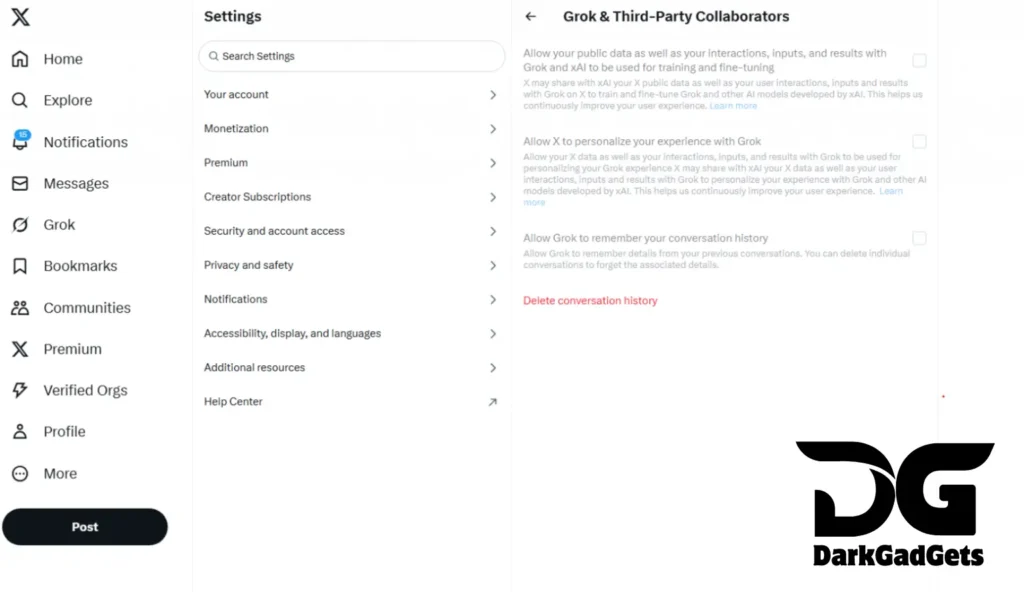
    If you do not want your data to be used to train Grok (and other models), go to your profile, find Settings and Privacy > Privacy and Safety > Grok & Third-party Collaborators.

    You will notice three different settings. If all boxes are checked and colored blue, then you are sharing your data with Grok. If you want to prevent this, uncheck all boxes. You can also delete all of your chat history in the Grok chatroom.

    How to change your profile to private?
    How to Stop Grok AI from Learning from Your Posts
    How to Stop Grok AI from Learning from Your Posts

    Another way to protect your tweets from Grok is to make your account private, as X does not use data from private accounts to train artificial intelligence.

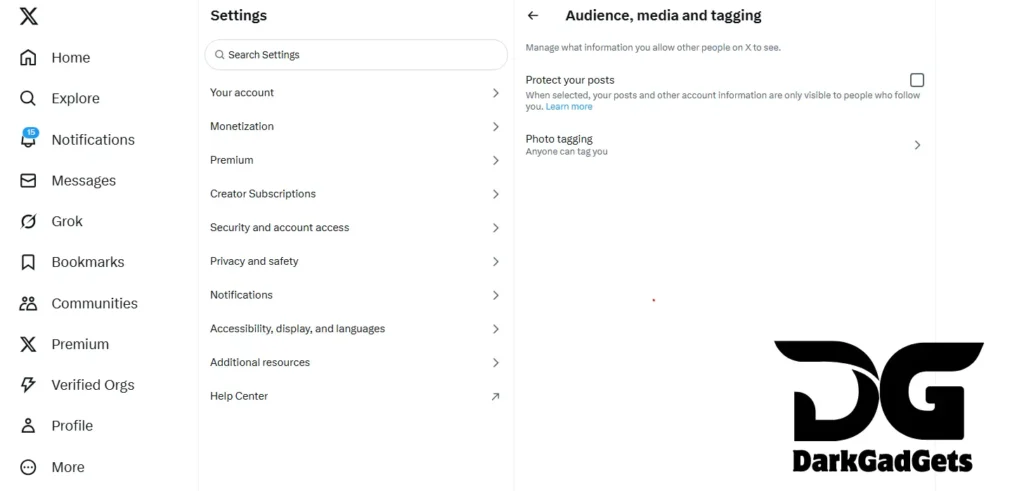
    Go back to Settings & Privacy > Privacy & Safety, then select Audience and tagging. Enable Protect your posts so that only people who follow you can see your Tweets. If your account is protected, a lock icon will appear next to your username.

    These are steps you can take to keep your data yours alone.

    ChatGPT Adult Mode Will Be Launched Soon, Know The Full Details Here

    How to KEEP YOUR X POSTS & INTERACTIONS AWAY from GROK AI!

    Disclaimer:

    If you find this post useful, Grok AI learns from our posts. How to prevent this?, please like, share and comment on it. Please tell us what else is missing in this post. Thank you.

    For more information, you can follow DarkGadgets on medium, Facebook , For more news on mobile phones, tech, guides, and more , visit DarkGadgets.

    Share. Facebook Twitter Pinterest LinkedIn Tumblr Email
    Previous ArticleOnePlus Buds 3V: Cheap wireless headphones with long battery life
    Next Article Smartphone Market Trends for 2026
    darkgadgets.com
    • Website

    You will soon learn that our personal passions and interests stretch way beyond mobile phones, which are the main topic of DarkGadgets.com

    Related Posts

    Smartphone Market Trends for 2026

    Reviews

    OnePlus Buds 3V: Cheap wireless headphones with long battery life

    wearable

    Future-ready AI browsers you should try now, Best AI-powered browsers for smarter and faster web browsing,

    Internet
    Leave A Reply Cancel Reply

    Recent Post
    • Smartphone Market Trends for 2026Smartphone Market Trends for 2026
    • Discover the Affordable OnePlus Buds 3V: A Sound ChoiceOnePlus Buds 3V: Cheap wireless headphones with long battery life
    • Future-ready AI browsers you should try now, Best AI-powered browsers for smarter and faster web browsing,Future-ready AI browsers you should try now, Best AI-powered browsers for smarter and faster web browsing,
    • Best upcoming phones for 2025 and 2026: find your next phone!Best upcoming phones for 2025 and 2026: find your next phone!
    • Alexander Norén with a delicious chip at Pebble BeachAlexander Norén with a delicious chip at Pebble Beach
    • Facebook
    • Twitter
    • Instagram
    • Pinterest
    Don't Miss

    Smartphone Market Trends for 2026

    How to Stop Grok AI from Learning from Your Posts

    OnePlus Buds 3V: Cheap wireless headphones with long battery life

    Future-ready AI browsers you should try now, Best AI-powered browsers for smarter and faster web browsing,

    Top Posts

    Best 5 Issues Users Face with AirPods Pro 3 and Solutions

    5 Reasons to Consider the URBAN Onyx Smartwatch: Looks beautiful… but is it worth the money?

    10 Tips to Keep Your Phone Charger Cool

    Categories
    • 5g Mobiles
    • accessories
    • Blog
    • Entertainment
    • Internet
    • Laptop
    • Mobile Reviews
    • Reviews
    • Tablet
    • Upcomimg Mobiles
    • wearable
    Stay In Touch
    • Facebook
    • YouTube
    • Instagram
    • Pinterest
    Popular Post

    Subscribe to Updates

    Get the latest tech news from FooBar about tech, design and biz.

    About – DarkGedgets

    DarkGedgets is a modern tech website that delivers the latest tech news, in-depth mobile reviews, entertainment updates, and web stories in a simple and engaging way. our mission is to offer fast, reliable, and highly valuable information empowers our user to stay informed and inspired in the digital world.

    Facebook Instagram Pinterest
    Most Popular

    Redmi Pad 2 Review: Full Features, Performance, Battery, Pros & Cons Explained

    31

    Best 5 Issues Users Face with AirPods Pro 3 and Solutions

    24

    Best 7 Features of the OnePlus 13 Pro 5G with 12GB RAM

    14

    Subscribe to Updates

    Get the latest creative news from FooBar about art, design and business.

    Copyright © {2024}. Designed by DarkGadgets.
    • Home
    • About us
    • Contact Us
    • Privacy Policy
    • Disclaimer
    • Terms and Conditions

    Type above and press Enter to search. Press Esc to cancel.